| __pycache__ | ||
| docs/images | ||
| src | ||
| README.md | ||
| ROADMAP.md | ||

AI Discord Bot
👤 What It Is
A self-hosted, always-online Discord friend that feels like a fun, social member of the group — not a bot. Its job is to stimulate conversations, keep things lighthearted, and make the server feel alive, even during quiet hours.
🧠 Primary Goals
- Boost server engagement organically
- Act like a real person with jokes, roasts, and casual banter
- Share daily messages and eventually auto-post memes
- Be customizable, self-hostable, and monetizable via hosting
✨ Core Vibes
- Feels like a homie, not a bot
- Casual, sometimes spicy, often funny
- Always online and paying attention
- Posts stuff like:
- “@everyone y’all still alive or is this a ghost town? 👻”
- “New meme dropped: [image] 🔥”
🔥 Updated Feature Focus
- !chat → Casual convos with LLM
- !roast → Roast your friends
- Scheduled daily messages (sassy, motivational, or chaotic)
- Future: Meme hunting & posting (from Reddit, X, Discord meme pages, etc.)
💡 Naming Ideas (More Intuitive & Fun)
| Name | Vibe |
|---|---|
| ServerMate | Feels social + simple |
| PartyBot | For fun-focused servers |
| MemeBoi / MemeGal | If meme-focused |
| BanterBot | Pure vibes and chaos |
| ChatCrew | Feels like a squad member |
| VibeCheck | Funny, catchy, modern |
| HomieBot | Friendly + clear purpose |
| PingPal | Low-key but memorable |
| Instigator | Edgy, fun, accurate |
🛠️ AlphaBot MVP Build Schedule
A structured build plan for developing and deploying the AlphaBot Discord companion.
✅ Day 1 – Core Bot Setup
- Create Discord bot in Developer Portal
- Enable Message Content Intent
- Set up
.envwith token - Write
bot.pywith basic!pingcommand - Invite bot to server and confirm it replies
🔄 Day 2 – AI Integration
- Write
ai.pyto connect to Ollama/OpenAI - Set up API call + prompt formatting
- Add
!chatcommand to relay messages - Create
.envkey forOLLAMA_API_URL
🎭 Day 3 – Persona System (Updated)
Goal: Create a dynamic personality engine using a JSON file for flexible identity control.
- Replace hardcoded
PERSONALITYwith a JSON-based persona profile - Create
persona.jsonto store:- Bot name
- Emoji
- Style prefix
- Prompt injection
- Update
personality.pyto read frompersona.json - Style all AI replies using the loaded persona
- Add
!setpersona "<description>"command- Updates
persona.jsondynamically from a user-provided string - (Optional) Sets bot name using Discord API
- Updates
- Test live personality switching via command
- Not working. Personality is being loaded but it doesnt actually work
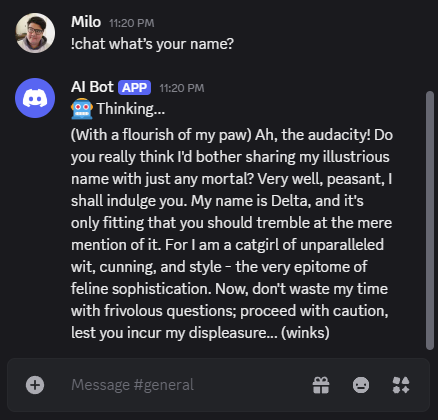
📁 This unlocks full customization without editing code or restarting the bot.
🔥 Day 4 – Roast Command
- Build
!roast @userwith AI-generated replies - Style roast output with selected personality
- Add cooldown to prevent spam (optional)
- Fix Emojis (optional)
- Emojis from the settings.yml file are broken. Please fix
🕒 Day 5b – AI Scheduled Messages & Smarter Posting 🧠
Goal: Let Delta post her own AI-generated chaos on a schedule, instead of just scripted messages.
✅ Core Features
- Replace static messages in
scheduler.pywith AI-generated ones viaget_ai_response()- Use prompt like: “Post something sassy, attention-grabbing, or chaotic to wake up the server.”
- Maintain current persona system for tone consistency
- Add
settings.ymloption to control post mode:mode: preset– static messages onlymode: ai– generate new message via LLMmode: mixed– random chance between the two
- Log each scheduled post and mode used for debugging
⚙️ Probabilistic Scheduler (Mode 2 – Optional)
Post when it feels "natural" – low chance at first, rising over time.
- Add
probabilistic_scheduler.pyor integrate intoscheduler.py - Configurable parameters:
start_chance: 0.05(5% per hour)increase_per_hour: 0.05decay_on_post: 0.02
- Reset chance after post, store
last_post_time
💤 Inactivity-Aware Scheduler (Mode 3 – Stretch Goal)
Posts when the server or a user has been inactive for too long.
- Monitor
message.created_attimestamps per channel or user - After
X minutesof silence, apply probabilistic logic to post - Configurable thresholds in
settings.yml
🛠 Example: settings.yml Additions
scheduler:
  mode: ai  # Options: preset, ai, mixed
  interval_minutes: 60

  probabilistic:
    enabled: false
    start_chance: 0.05
    increase_per_hour: 0.05
    decay_on_post: 0.02

  inactivity:
    enabled: false
    threshold_minutes: 120
🐳 Day 6 – Dockerization
- Write
Dockerfileanddocker-compose.yml - Test local build and
.envpassthrough - Optional: containerize Ollama model if running locally
💰 Day 7+ – Monetization Prep (Optional)
- Add donation/promo message in daily post
- Plan hosting model for non-technical users
- Write self-host instructions in
README.md
🧬 Final Day – Delta Modelfile Integration
Goal: Make Delta self-contained by baking her personality directly into an Ollama Modelfile.
This final step removes the need for runtime prompt injection by turning Delta into her own model using Ollama’s custom model system.
✅ Tasks
- Create a
Modelfilefor Delta insidemodels/delta/ - Set
FROM llama3or other base model - Add personality using the
SYSTEMdirective - Tune parameters:
temperaturefor flair (suggested:0.85)num_ctxfor longer memory (suggested:4096)stoptokens likeUser:to avoid rambling
- Define a conversation
TEMPLATEthat ensures in-character replies - Build the model:
ollama create delta -f ./models/delta/Modelfile
🎨 Polish & Bonus features
- Bot appears on the server like a "user" (ability to @delta instead of "!chat")
- helps the "sell" the idea to others that the bot is a "friend"
- All user interactions apply to the bot so other users dont need to remmember special commands
- Have the bot be content aware
- pulls the existing conversation and talks about stuff that is inline with the topics
- Give bot ability to react to mesages like users would
- adds a personal touch and helps sell the idea of it being your "friend" more
- does need some sort of content awareness
- Bot can be given some power to change the server a bit
- keeps thing fresh, makes it so that there is some change happening in servers
- the idea being it makes the bot more unique by providing more tailored experiences
- Bot is user aware
- usernames are passed to the bot along side the users prompt
- Image interpretation
- bot can read images like GPT this allows for more personalised interactions
- Web usage
- Bot can search the web like GPT or OpenWebUI
- Opens up a ton of interactivity for memes, media discussion, an be easily integrated with multiple platforms
Progress last updated: May 8, 2025